Monday, September 17, 2012
Speedtest on your own NAS
[TUTORIAL] How to test the speed of your local network
http://forum.qnap.com/viewtopic.php?t=10571
Speedtest Mini
http://www.speedtest.net/mini.php
SPEEDTEST.NET MINI
Setup Instructions
Download mini.zip
Unzip it onto your server
Decide on PHP, ASP.NET, ASP or JSP
Select which index file to use
Rename the file to index.html
Load index.html in your browser
Download Now
You can also copy the commented code from index.html and paste it into an existing web page. Just be sure to keep the speedtest folder and speedtest.swf in place.
You can host a free speed test on your own server that uses the same technology as Speedtest.net! Setup is very simple, and the only requirement is that your web server supports PHP, ASP.NET, ASP or JSP.This application is offered "as is" free of charge without any support - use it at your own risk. We will introduce new features to it every few months in required updates. As such you will have to download it again periodically.
While Speedtest.net Mini will work on almost any web server, some require minor settings changes. Read the troubleshooting file included in mini.zip for further details.
If you need a permanent speed test with detailed reporting and/or your own branding, please head over to the Ookla web site.


Friday, July 20, 2012
Monday, July 02, 2012


Wednesday, June 27, 2012
Android Root? What that for?
Root Screen Capture
http://hi.baidu.com/%C7%A7%C0%EF%C5%AA%D0%A1%B1%F8/blog/item/1c41841cb9331605403417a3.html
Root download
http://bbs.fengbao.com/thread-947737-1-1.html
More
http://www.howardforums.com/showthread.php/1733190-Sharp-SH7218U-Market-enable
http://hi.baidu.com/%C7%A7%C0%EF%C5%AA%D0%A1%B1%F8/blog/item/1c41841cb9331605403417a3.html
Root download
http://bbs.fengbao.com/thread-947737-1-1.html
More
http://www.howardforums.com/showthread.php/1733190-Sharp-SH7218U-Market-enable
Tuesday, June 26, 2012
Monday, June 25, 2012
Macbook Pro HDD & RAM upgrade
Recent RAM price has been dropped. I also try to upgrade my harddisk and RAM in the Macbook Pro 2009. It is originally 160GB 2.5" harddisk and 1GB DDR3 RAM.
I chose OCZ 120GB green version and Kingston 4GB DDR3 x2. This Macbook Pro limits the RAM to 8GB.
The way to open the back cap of the Macbook Pro is already easily searched from the internet.
Unfortunately, the screws of the fixture of the harddisk are still T6 screw in this 2009, but not usual "+" ones. You may buy any screw driver set from shop. It looks like a star, similar but not really.

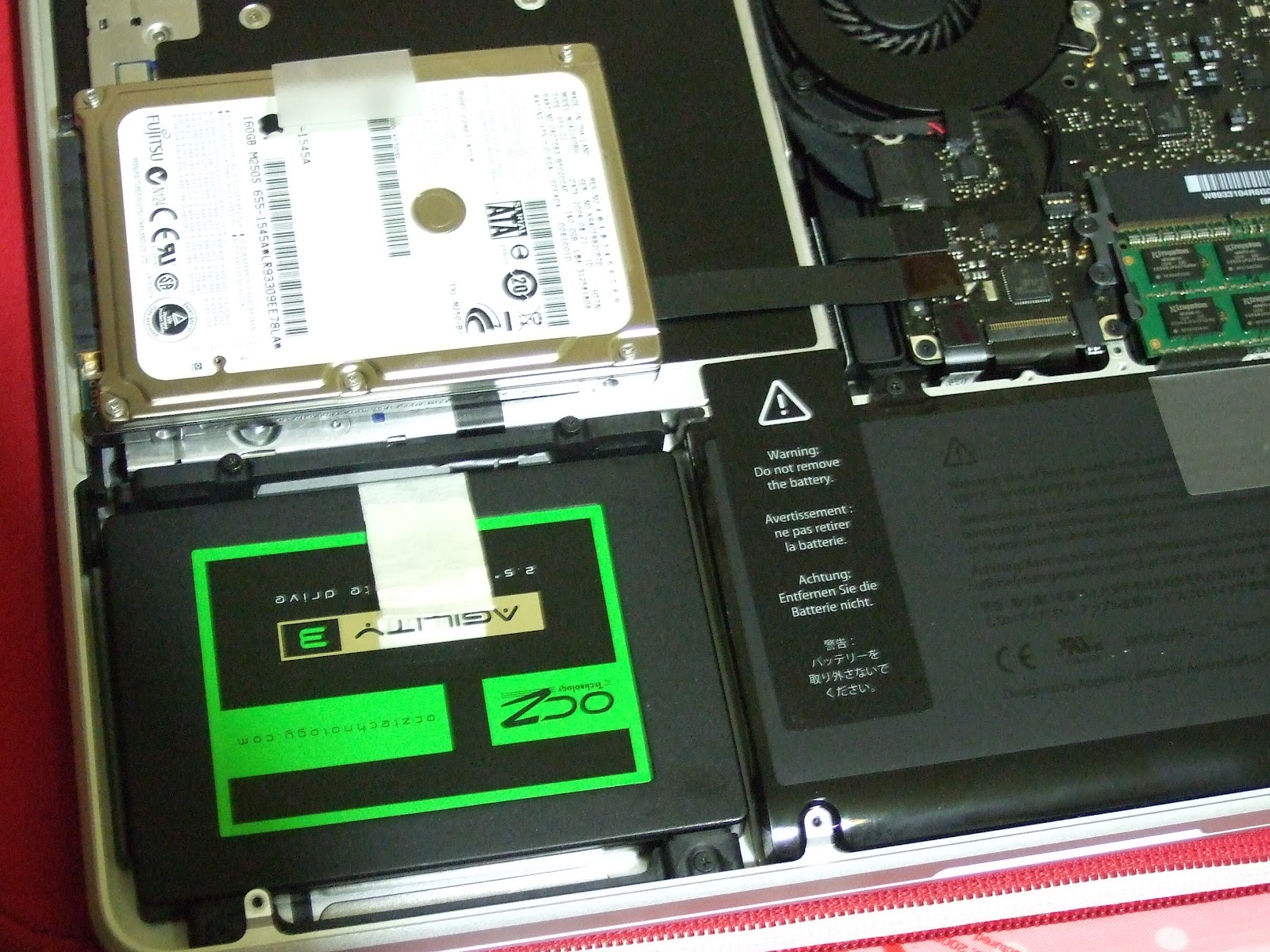
I had created the boot USB drive. After the new blank harddisk is installed, just plug in the USB drive and select install Mac OS X Lion. You need to first upgrade to Mac OS X Lion first.

Pandora's box: 日系摺疊智慧手機 SHARP -- sh7218u 開箱
Pandora's box: 日系摺疊智慧手機 SHARP -- sh7218u 開箱: 關於對此機的google服務和其他軟體改造,請參考 -- S HARP sh7218u 完全android化篇 我從以前就一直比較偏好摺疊機的設計,感覺不容易誤觸按鍵和傷到螢幕(現任的n82就常因為誤觸而解鎖加發簡訊) 無奈智慧型手機有傳統直立型、都一個樣的觸控...
Pandora's box: SHARP sh7218u 完全android化篇
Pandora's box: SHARP sh7218u 完全android化篇: 話說買了7218u後( 請參考 日系摺疊智慧手機 SHARP -- sh7218u 開箱 ) , 一直煩惱於日曆無法跟google同步,market也不能用的半殘android窘境,在參考一些論壇和玩機達人的文章後,決定自己來個軟體改造 (相關檔案文末有連結)
Saturday, June 23, 2012
iMovie projects lost after iMovie 09' update
After the update of iMovie 09' under the OS X Lion, I lost all the iMovie project!!!
The projects file are there but you cannot see them in the project window of iMovie. The project window is empty. After searching in the internet, I finally found the method to fix.
Source:
https://discussions.apple.com/message/9202163?messageID=9202163%25EF%25BF%25BD#9202163?messageID=9202163%25EF%25BF%25BD
Quote:
It works for me too!
The projects file are there but you cannot see them in the project window of iMovie. The project window is empty. After searching in the internet, I finally found the method to fix.
Source:
https://discussions.apple.com/message/9202163?messageID=9202163%25EF%25BF%25BD#9202163?messageID=9202163%25EF%25BF%25BD
Quote:
Here's how I got my project back after it disappeared: Close the iMovie application. Then on your desktop click to open "Macintosh HD>Users>YourName>Movies>iMovie Projects>"YourProject'sName." This folder will have the name of the project you "lost." Open the folder, and you will see "Project," which will look like a document, but will not open. There will also be folders for QuickLook and Stills. Go to the "Project" document and change the name of it to "Project.rcproject." Then open iMovie, and your project will be back in the projects just like it was before the crash. At least that was my experience.
Good luck!iMama
It works for me too!
Wednesday, June 20, 2012
Thursday, June 14, 2012

Wednesday, June 13, 2012
佩服Apple的決心﹣沒有DVDRW的Macbook Pro
當全世界都認為愈高規格的Notebook理應把最多的功能都集中在一起,Apple就偏偏把DVDRW刪除了,全身投入cloud,依頼internet及memory card的new generation了!
因此,他們才成功再把接近一寸厚的機身造得再薄一點,接近0.7吋。
這個決心,佩服!

因此,他們才成功再把接近一寸厚的機身造得再薄一點,接近0.7吋。
這個決心,佩服!

Saturday, June 09, 2012
Friday, June 08, 2012
Wednesday, May 30, 2012
How to embed PDF in PhoneGap?
Here is the answer.
ChildBrowser, but only on iPhone
http://stackoverflow.com/questions/3378116/iphone-phonegap-pdf-issue
https://github.com/purplecabbage/phonegap-plugins/tree/master/iPhone/ChildBrowser
ChildBrowser, but only on iPhone
http://stackoverflow.com/questions/3378116/iphone-phonegap-pdf-issue
https://github.com/purplecabbage/phonegap-plugins/tree/master/iPhone/ChildBrowser
Monday, May 28, 2012
Friday, May 25, 2012
可怕的Xtrancend CF卡經驗
年初因工作需要急買一張CF卡,附近有Xtrancend及Sandisk兩個選擇,當時只想,便宜一點就是了;結果當天還可以用,幾個月後,在內的相片不見了,相機和電腦都不能辨認,害我花十多個小時recover。大半年後的今天,我再一次把它放進相機裡,多次格式化也是辨認不到,唯有用電腦把它的partition重新做一次,好像可以;試用幾天再說吧!
以後,都是固執地選S牌好了。
以後,都是固執地選S牌好了。
Subscribe to:
Posts (Atom)