Saturday, November 09, 2013
訪問香港電視網絡王維基 ﹣ 司法覆核關乎社會利益與及公司利益的平衡
「作為一個生意人,我應該把社會利益放高一些,還是公司利益放高一些.....我現時還未有決定」(片段10:47)
王維基坦言未有最後決定,但這個深層並顧及社會大眾的考慮,已經表現出他是一個深思熟慮的企業家。


HKTV王維基暗吋特首梁振英﹣講得出做唔到
這部書看來立刻成為書局的Top Best Seller!
《如果是你的子女》
http://www.chunghwabook.com.hk/9789628931866/

內容簡介
行政會議召集人梁振英,近年經常撰文縱論時政,其觀點獨到,常引來社會各界迴響。本書精選了他90多篇具代表性的文章,內容涉及香港的深層次矛盾,也有兩制之間的關係、國內改革開放的經驗總結,以至世界經濟走向對香港的影響等,視野寬闊,值得各界關心香港未來發展的人士細讀。
 |
作者簡介
梁振英
梁振英,1999年起出任行政會議召集人,2003年起任全國政協常委。現為英國戴德梁行上市控股公司(DTZ Holdings plc) 董事兼亞太區主席。
Tuesday, October 22, 2013
Why have young people in Japan stopped having sex?
http://flip.it/HKZnl
Why have young people in Japan stopped having sex?
http://www.theguardian.com/world/2013/oct/20/young-people-japan-stopped-having-sex

Why have young people in Japan stopped having sex?
http://www.theguardian.com/world/2013/oct/20/young-people-japan-stopped-having-sex
Thursday, February 21, 2013
外籍遊客辦理台灣預付電話卡和 iPhone 3G 行動上網教程
Source: http://www.backpackers.com.tw/forum/showthread.php?t=657714
中華電信外籍旅客預約預付卡門號: https://123.cht.com.tw/webecss/prepaidcard/
小弟就快要到台灣旅行了,這次是第一次去台灣,而且希望全程都可以使用我的 iPhone 上網,所以花了好一些時間選擇電訊公司和辦理電話卡及3G上網的方法。
從論壇上和一些部落格的文章中,我得知中華電信在全台灣的上網速度比較好,因此我就決定要申請中華電信的電話卡。
不料,我很快地從一些帖子中獲知,中華電信的電話卡沒辦法獨立上網,需要另外辦理一張上網用的電話卡。這消息令我非常困擾,因為這表示辦理的過程將會比較麻煩,況且我需要同時使用語音和上網服務。
正當我打算放棄中華電信使用台灣大哥大時,我在中華電信的網站上卻看到不太符合這個說法的內容。於是我從馬來西亞打了一個越洋電話到中華電信的客服中心,客服很快地回答了我所有的疑問,而且在得知我的情況後,主動向我推薦了最適合外籍遊客的電話卡和 3G 行動上網服務。
其實中華電信的電話卡同時可以提供語音和 3G 上網服務,並不需要另外辦理上網卡,而且還可以提供適用於 iPhone 和 iPad 等設備需要的 Micro SIM 卡。
更完美的事情是,中華電信竟然為外籍遊客準備了專用的網絡客服中心,讓外籍遊客在抵達台灣前就可以辦理電話卡預約,讓遊客可以在抵台後馬上在機場領取電話卡。
外籍旅客要預約中華電信預付卡門號的話,可以到 https://123.cht.com.tw/webecss/prepaidcard/,這個專用網頁提供了服務詳情、申辦方法、服務價格、需注意事項等齊全的資料。
在結束了與客服的通話後,我馬上到這個網站進行了線上預約,不用幾分鐘,我完成了預約申請,接下來就是在抵台後到中華電信在機場的服務中心領取電話卡了,真的非常方便,對遊客非常友好,我相信這對來自馬來西亞、香港、中國等全世界外籍遊客來說非常有用。
最後值得我一提的是,我沒想到台灣的客服服務這麼好,不但很耐心,而且主動告訴我很多我完全沒提到的問題,還體貼地提醒我很多應該注意的事項,難道台灣的服務人員都那麼好嗎?還是我們馬來西亞的客服太差勁了?無論如何,非常感謝中華電信客服!
我把自己的經歷寫在這裡,希望更新網上很多已經不適用的資料,希望對到台灣旅遊的朋友有幫助!
XXXXXXXXXXXXXXXXXXXXXXXXXXXXXXXXXXXXXXXXXXXXXXXXXXXXXXXXXXXXXXX
中華電信外籍旅客預約預付卡門號: https://123.cht.com.tw/webecss/prepaidcard/
小弟就快要到台灣旅行了,這次是第一次去台灣,而且希望全程都可以使用我的 iPhone 上網,所以花了好一些時間選擇電訊公司和辦理電話卡及3G上網的方法。
從論壇上和一些部落格的文章中,我得知中華電信在全台灣的上網速度比較好,因此我就決定要申請中華電信的電話卡。
不料,我很快地從一些帖子中獲知,中華電信的電話卡沒辦法獨立上網,需要另外辦理一張上網用的電話卡。這消息令我非常困擾,因為這表示辦理的過程將會比較麻煩,況且我需要同時使用語音和上網服務。
正當我打算放棄中華電信使用台灣大哥大時,我在中華電信的網站上卻看到不太符合這個說法的內容。於是我從馬來西亞打了一個越洋電話到中華電信的客服中心,客服很快地回答了我所有的疑問,而且在得知我的情況後,主動向我推薦了最適合外籍遊客的電話卡和 3G 行動上網服務。
其實中華電信的電話卡同時可以提供語音和 3G 上網服務,並不需要另外辦理上網卡,而且還可以提供適用於 iPhone 和 iPad 等設備需要的 Micro SIM 卡。
更完美的事情是,中華電信竟然為外籍遊客準備了專用的網絡客服中心,讓外籍遊客在抵達台灣前就可以辦理電話卡預約,讓遊客可以在抵台後馬上在機場領取電話卡。
外籍旅客要預約中華電信預付卡門號的話,可以到 https://123.cht.com.tw/webecss/prepaidcard/,這個專用網頁提供了服務詳情、申辦方法、服務價格、需注意事項等齊全的資料。
在結束了與客服的通話後,我馬上到這個網站進行了線上預約,不用幾分鐘,我完成了預約申請,接下來就是在抵台後到中華電信在機場的服務中心領取電話卡了,真的非常方便,對遊客非常友好,我相信這對來自馬來西亞、香港、中國等全世界外籍遊客來說非常有用。
最後值得我一提的是,我沒想到台灣的客服服務這麼好,不但很耐心,而且主動告訴我很多我完全沒提到的問題,還體貼地提醒我很多應該注意的事項,難道台灣的服務人員都那麼好嗎?還是我們馬來西亞的客服太差勁了?無論如何,非常感謝中華電信客服!
我把自己的經歷寫在這裡,希望更新網上很多已經不適用的資料,希望對到台灣旅遊的朋友有幫助!
XXXXXXXXXXXXXXXXXXXXXXXXXXXXXXXXXXXXXXXXXXXXXXXXXXXXXXXXXXXXXXX
Thursday, February 14, 2013
Wix.com - It’s time you get your own website. Your domain. Your style. Your way.
Wix lets everyone create their own website for an original and stunning presence.

40,000 new users every day. Over 25,000,000 sites
No coding needed and it's free.
Grab any pre-designed template or start from scratch. Create your own website instantly.
Add ANYTHING: pics, forms, videos, music, restaurant menus... the list is endless..
Wix is dedicated to providing you with the best, most reliable hosting, 100% free.
All you need in one place. Create websites, mobile sites, Facebook pages & blogs too
基于人脸识别的响应式排版
王壮 发表于 17小时前 响应式排版 /Marko Dugonjić

来源: [ thenextweb.com ]
Source: http://www.36kr.com/p/201317.html?vt=0
随着网站访客中有越来越多的用户通过移动设备访问,响应式排版最近也变得更加流行,在谈到2013年设计趋势时,很多人都会把响应式排版算进去。
现在有一个 Web 设计师Marko Dugonjić,把响应式排版带到了一个新的高度:通过脸部识别来判断一个用户距离电脑屏幕的远近,然后自动调整网站字体的大小。
Dugonjić给出了两个选项,一个叫 on load,第一次识别后把字体大小固定。另一个叫 real time,随时根据脸与屏幕的距离变化来改变字体大小。
点击这里自己亲自去试一试吧。
来源: [ thenextweb.com ]
Source: http://www.36kr.com/p/201317.html?vt=0
Wednesday, January 16, 2013
Email Capture - Kiosk Solution
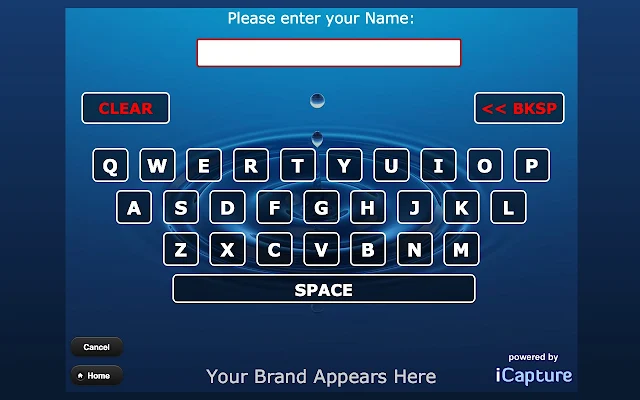 If you have want to setup a kiosk to collect visitors' email and send them more about your company and production information, try "Email Capture" in Chrome Web Store.
www.icapture.com
Email Capture turns your Chrome Browser into an Email Marketing Machine!
Email Capture turns your Chrome Browser into an Email Marketing Machine!  Building your database of prospects and customers has never been this easy.

Designed to work with a TouchScreen, Email Capture makes capturing prospect and customer information easier than ever!

In less than 5 minutes, your Chrome Browser can be collecting:
** Name
** Email
** Phone, Address, Zip, etc.
** Customer Interests & Preferences

You decide!  What information do you need?  What questions do you want to ask?

Email Capture allows you to capture the information you need… quickly and easily.  No more clunky web forms.  No more confusion.  You control the inputs.  You control the process.

Once you've captured the data, Email Capture allows you one-click access to export your data - or - let us forward the data automatically to your email provider.  Look at the screen shots, install our app, and immediately test-drive Email Capture.

Looking for a KIOSK solution?

Email Capture can be quickly setup to be the perfect software solution for your TouchScreen or iPad Kiosk!

If you need a customized version, we can build custom questions for you as well.   See our website for more details.
Tuesday, January 15, 2013
How to Setup your own Proxy Server for Free
How to Setup your own Proxy Server for Free
through Google App Engine.
http://www.labnol.org/internet/setup-proxy-server/12890/
It seems that the script in App Eng is either Java or Python.
Monday, January 07, 2013
給退了: iPad mini 訂購數量上限
 Apple Store Apple Store | |||||
iPad mini 訂購數量上限
| |||||
網上訂單:xxx
銷售訂單:yyy
| |||||
| 親愛的 Apple 顧客: 多謝您最近在 Apple Online Store 訂購 iPad mini。 我們感謝您對 iPad mini 的支持,但是 Apple 無法提供超出每位顧客訂購數量上限的訂單。 您的 iPad mini 訂單已經取消,而我們不會向您收取任何費用。 多謝選購 Apple 產品與服務 致上誠摯祝福 Apple Online Store 團隊 |
Friday, December 28, 2012
Downgrade iPod Touch 4G 8G from iOS 6 to 4.3 - GPRS connected using Raisoo apple peel
Downgrade Apple iOS 6 to iOS 4.3.3 or iOS 4.2.1 (Mac)
Condition:
1. iPod Touch 4G 8G
2. iOS 6
3. Already Jailbroken in iOS 4.2.1, iOS 4.3.3, iOS 5.1
(You can check using Redsn0w. Who remember when you did the jailbreak?)
(You can check using Redsn0w. Who remember when you did the jailbreak?)
Downgrade Process from iOS 6 to iOS 4.2.1
1. How To Downgrade iPhone 4, iPhone 3GS, iPod Touch 4G From iOS 6 Using Redsn0w
http://www.iphonehacks.com/2012/10/downgrade-iphone-ipod-touch-4g-from-ios-6-using-redsn0w.html
2. Saving SHSH Blobs from and to Cydia with redsn0w and Tiny Umbrella
http://www.coolestguyplanettech.com/saving-shsh-blobs-from-cydia-to-local-directory-with-tiny-umbrella/
http://www.coolestguyplanettech.com/saving-shsh-blobs-from-cydia-to-local-directory-with-tiny-umbrella/
3. Download iOS Firmware File For iPod Touch
http://www.iphonehacks.com/download-ipod-touch-ios-firmware
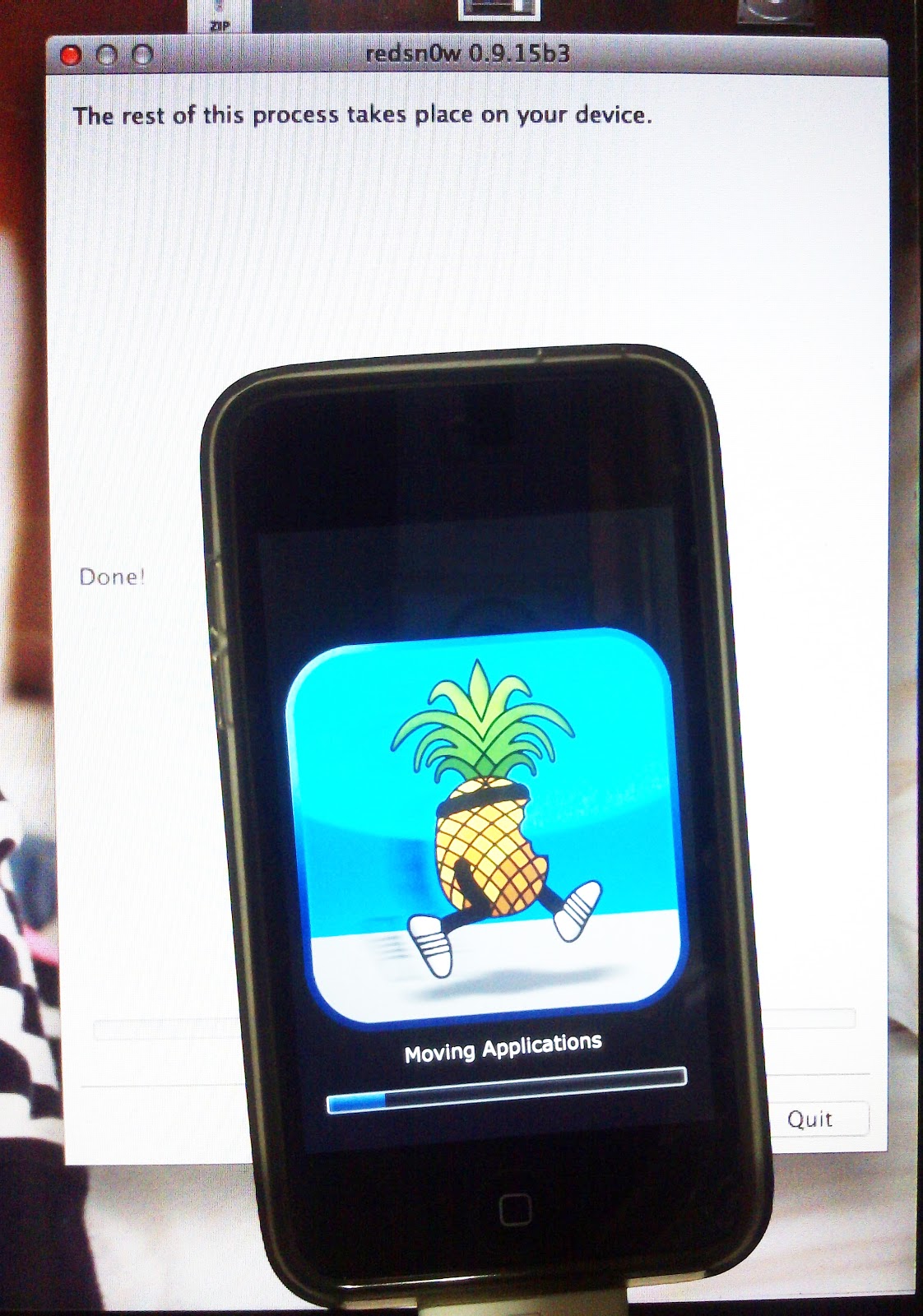
Nothing to do during the process. "The rest of the process takes place on your device." It takes about 8 minutes on my old iPod Touch 4 8G.


http://www.iphonehacks.com/download-ipod-touch-ios-firmware
Nothing to do during the process. "The rest of the process takes place on your device." It takes about 8 minutes on my old iPod Touch 4 8G.

Something you need to know
 |
| Using your Mac/Macbook |
 |
| Using Redsn0w |
No data restore anymore but only Apps

Remember to send out your photos and video using dropbox, box or Tonido, importing to iPhoto or whatever.
Backup your contacts too!
Basically it is like you are getting a brand new machine but you cannot retrieve all current data.
Activate iOS through iTune (old practice for iOS 4.3 and 4.2.1)

I nearly forgot I have to do so to activate the iOS device. Apple allows users to use iOS device alone after iOS 5.1.
1. How To Jailbreak iPod Touch 4G, iPod Touch 3G, iPod Touch 2G On iOS 4.2.1 Using Greenpois0n [Mac]
http://www.iphonehacks.com/2011/02/how-to-jailbreak-ipod-touch-4g-ipod-touch-3g-on-ios-4-2-1-using-greenpois0n-mac.html
Note: My experience is that I failed to use redsn0w to jailbreak iOS 4.2.1 directly. It is stuck at the screen of a Apple in the middle. I have to tried for three times and wait at least 10 minutes each time. But it did not help.
Now I am following the guide using greenois0n. Let see if it works......well. It works smoothly!
Another problem is my daughter's favorite APPS Little Fox does not support iOS 4.2.1. but only 4.3+.
2. JailbreakMe 3.0 Released To Jailbreak iPhone 4, iPhone 3GS, iPad 2, iPad 1, iPod Touch 4G, iPod Touch 3G On iOS 4.3.3 Using Mobile Safarihttp://www.iphonehacks.com/2011/07/jailbreakme-3-0-released-to-jailbreak-iphone-4-iphone-3gs-ipad-2-ipad-1-ipod-touch-4g-ipod-touch-3g-on-ios-4-3-3-using-mobile-safari.html
This method is the most easiest and quickest way to jailbreak iOS device ever!
I now can restore from previous backup at iOS 4.2.1 to retrieve the APPS into the iPod. Great! Just wait to see.


Now the iOS version is 4.3.3. I can install Little Fox music box for my little daughter. Now it is play time for me.
Let me try to get it connected to the internet.
Enter Cyndia. Add source for "http://apt.raisoo.com".
Remember to install GPRS Connection and Raisoo main program.
Finally I tried the Raisoo Apple Peel (Old version). I succeeded to use GPRS to connect to the internet! Wow!
You can use Safari, WeChat whatever to connected to internet. It is no longer limited to some Chinese apps like UC Web, QQ, etc.
 The SIM card is CM Mobile HK.
It is weird to see both "iPod" and "3G" label together. But when you see these (together with two SIM card), it is connected to internet via GPRS already.
You don't need to turn the Wi-Fi off before doing this. It will shut down Wi-Fi automatically. But I will recommend to shut down by yourself first, for sake of any error during usage.
 Using Smartone (Hong Kong) is good for GPRS connection. However the upload/download speed is too slow to accept. I think I can take this connection as emergency. It always happens that you need to access internet to check a very important email or send a message during weekend or holiday.
The first time is the Perf Test data done using Raisoo Apple Peel for iPod Touch 4 GPRS. Download speed is 4bps. Upload speed is 2bps. The latency is about 4 seconds!
Surprisingly Raisoo works to imitate as a GPRS connection.
The second time is done using Wi-Fi (HKBN bb100).
There is a bug for the APN setting. The apps failed to save the current APN setting. Even though I typed "Smartone" and get connected. The APN field changes back to "CMNET". This does no harm if you use CM Mobile HK or China Mobile in China. But it is troublesome for me to type again when I need to connect to GPRS.
The one important point, as there is always a warning in the GPRS connection page. You can either use phone function (including SMS) or GPRS.


Jailbreaking iOS 4.2.1 AGAIN
1. How To Jailbreak iPod Touch 4G, iPod Touch 3G, iPod Touch 2G On iOS 4.2.1 Using Greenpois0n [Mac]
http://www.iphonehacks.com/2011/02/how-to-jailbreak-ipod-touch-4g-ipod-touch-3g-on-ios-4-2-1-using-greenpois0n-mac.html
Note: My experience is that I failed to use redsn0w to jailbreak iOS 4.2.1 directly. It is stuck at the screen of a Apple in the middle. I have to tried for three times and wait at least 10 minutes each time. But it did not help.
Now I am following the guide using greenois0n. Let see if it works......well. It works smoothly!
Another problem is my daughter's favorite APPS Little Fox does not support iOS 4.2.1. but only 4.3+.
2. JailbreakMe 3.0 Released To Jailbreak iPhone 4, iPhone 3GS, iPad 2, iPad 1, iPod Touch 4G, iPod Touch 3G On iOS 4.3.3 Using Mobile Safarihttp://www.iphonehacks.com/2011/07/jailbreakme-3-0-released-to-jailbreak-iphone-4-iphone-3gs-ipad-2-ipad-1-ipod-touch-4g-ipod-touch-3g-on-ios-4-3-3-using-mobile-safari.html
This method is the most easiest and quickest way to jailbreak iOS device ever!
I now can restore from previous backup at iOS 4.2.1 to retrieve the APPS into the iPod. Great! Just wait to see.
Get Raisoo Apple Peel (Old version) connected to GPRS


Now the iOS version is 4.3.3. I can install Little Fox music box for my little daughter. Now it is play time for me.
Let me try to get it connected to the internet.
Enter Cyndia. Add source for "http://apt.raisoo.com".
Remember to install GPRS Connection and Raisoo main program.
Finally I tried the Raisoo Apple Peel (Old version). I succeeded to use GPRS to connect to the internet! Wow!
You can use Safari, WeChat whatever to connected to internet. It is no longer limited to some Chinese apps like UC Web, QQ, etc.

It is weird to see both "iPod" and "3G" label together. But when you see these (together with two SIM card), it is connected to internet via GPRS already.
You don't need to turn the Wi-Fi off before doing this. It will shut down Wi-Fi automatically. But I will recommend to shut down by yourself first, for sake of any error during usage.
Tomorrow I will try to use another SIM card other than CMNET.
......The Next day.....

The first time is the Perf Test data done using Raisoo Apple Peel for iPod Touch 4 GPRS. Download speed is 4bps. Upload speed is 2bps. The latency is about 4 seconds!
Surprisingly Raisoo works to imitate as a GPRS connection.
The second time is done using Wi-Fi (HKBN bb100).
There is a bug for the APN setting. The apps failed to save the current APN setting. Even though I typed "Smartone" and get connected. The APN field changes back to "CMNET". This does no harm if you use CM Mobile HK or China Mobile in China. But it is troublesome for me to type again when I need to connect to GPRS.
The one important point, as there is always a warning in the GPRS connection page. You can either use phone function (including SMS) or GPRS.
Snapshot of my old Raisoo apple peel for iPod Touch 4.
I purchased it in November 2011.


 |
| Comparing to iPhone 4 (with pink case) |
 |
| One size larger |

Friday, December 21, 2012
Indoor GPS?
http://www.williamlong.info/archives/3178.html
http://indoor-positioning.co.uk/2012/03/who-are-the-players-in-indoor-positioning/
Indoor GPS Apps
http://www.meridianapps.com
Who Are The Players In Indoor Positioning?
http://indoor-positioning.co.uk/2012/03/who-are-the-players-in-indoor-positioning/
Indoor GPS Apps
http://www.meridianapps.com
霸權
香港人怎麼不會生氣﹖
因為正在做(明天DEADLINE)MBA課程有關risk management的功課時,搜尋到一篇關於霸權(作者行文於2009年,當時未有流行此字眼)的分享,引起一些發人深省的討論。
Monday, December 10, 2012
勁cutie的電音二胡?!!! Otamatone
It's a breeze to squeeze & tease out a tune with no keys!
“The world’s cutest, weirdest musical instrument”
Straight from Japan, the sensation known as the Otamatone has got to be the world’s quirkiest electronic musical instrument ever. Invented by Maywa Denki, the Otamatone is a great toy for kids, or a fun addition to any musician’s arsenal of unique instruments.
Most musical instruments don't have faces, and there is probably a very good reason for that; nobody thought of it before! Allow us to introduce one of the cutest musical instruments ever - and it has a face! It is a singing musical-note shaped toy which requires two hands to be played: while one hand holds and/or repeatedly opens and closes the mouth by squeezing the note's rubber cheeks to get vibrato (or any sort of wah-wah effect), the other hand controls the pitch of the tune by sliding the finger up and down the stem. The strip on the stem has no pitch labels or frets, so having a good musical ear is an advantage, but that said, you can easily just slide between notes, both for ease of playing and for even more musical effect. The distinctly Japanese Otamatone Electronic Instrument is wacky, adorable, and a great instrument for some truly unique electronic performances.
*Slide your finger up and down the stem to change the pitch.
*Squeeze the cheeks for vibrato.
*Three pitch levels and two volume levels.
*Squeeze the cheeks for vibrato.
*Three pitch levels and two volume levels.
[Source here: ]
http://www.alexcious.com/products/detail84.html?gclid=CJOz2vqcj7QCFSNU4godslMAJw
But this one called Otamatone Jumbo is somehow...looking stupid.
http://www.youtube.com/watch?v=g_1WvxYBGTk
And you can play iOS Otamatone too!
There of course iPad version. It is must more worthy to play! I just checked the price on the App Store. It cost HK $28.00, rather cheap.
Friday, December 07, 2012
Recycle, Reuse, Reduce - Turning your old PC into your own private cloud server
I have kept upgrading the harddisks with larger volume. But what about the old ones? It is what a waste to throw them into rubbish bins. Those IDE harddisks are no longer accepted to be donated to charity. There is also not well system for recyling this electronic goods in Hong Kong.
I have came to an idea that I can make use of one of forgotten Dual-core PC and some harddisks of 320GB.
Here is some useful links I read.
Build your own personal cloud server
Turn an old PC into private online storage
Read more: http://www.pcadvisor.co.uk/how-to/software/3378792/build-your-own-personal-cloud-server/#ixzz2EKZdd6st
http://www.pcadvisor.co.uk/how-to/software/3378792/build-your-own-personal-cloud-server/?pn=2
Thursday, October 04, 2012

Monday, September 17, 2012
Speedtest on your own NAS
[TUTORIAL] How to test the speed of your local network
http://forum.qnap.com/viewtopic.php?t=10571
Speedtest Mini
http://www.speedtest.net/mini.php
SPEEDTEST.NET MINI
Setup Instructions
Download mini.zip
Unzip it onto your server
Decide on PHP, ASP.NET, ASP or JSP
Select which index file to use
Rename the file to index.html
Load index.html in your browser
Download Now
You can also copy the commented code from index.html and paste it into an existing web page. Just be sure to keep the speedtest folder and speedtest.swf in place.
You can host a free speed test on your own server that uses the same technology as Speedtest.net! Setup is very simple, and the only requirement is that your web server supports PHP, ASP.NET, ASP or JSP.This application is offered "as is" free of charge without any support - use it at your own risk. We will introduce new features to it every few months in required updates. As such you will have to download it again periodically.
While Speedtest.net Mini will work on almost any web server, some require minor settings changes. Read the troubleshooting file included in mini.zip for further details.
If you need a permanent speed test with detailed reporting and/or your own branding, please head over to the Ookla web site.
Friday, July 20, 2012
Subscribe to:
Posts (Atom)