Wednesday, January 16, 2013

Email Capture - Kiosk Solution

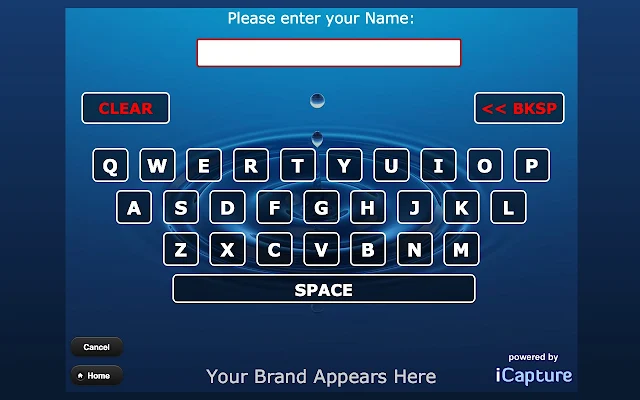
If you have want to setup a kiosk to collect visitors' email and send them more about your company and production information, try "Email Capture" in Chrome Web Store.

www.icapture.com


Email Capture turns your Chrome Browser into an Email Marketing Machine!

Email Capture turns your Chrome Browser into an Email Marketing Machine!  Building your database of prospects and customers has never been this easy.

Designed to work with a TouchScreen, Email Capture makes capturing prospect and customer information easier than ever!

In less than 5 minutes, your Chrome Browser can be collecting:
** Name
** Email
** Phone, Address, Zip, etc.
** Customer Interests & Preferences

You decide!  What information do you need?  What questions do you want to ask?

Email Capture allows you to capture the information you need… quickly and easily.  No more clunky web forms.  No more confusion.  You control the inputs.  You control the process.

Once you've captured the data, Email Capture allows you one-click access to export your data - or - let us forward the data automatically to your email provider.  Look at the screen shots, install our app, and immediately test-drive Email Capture.

Looking for a KIOSK solution?

Email Capture can be quickly setup to be the perfect software solution for your TouchScreen or iPad Kiosk!  

If you need a customized version, we can build custom questions for you as well.   See our website for more details.

Tuesday, January 15, 2013

How to Setup your own Proxy Server for Free


How to Setup your own Proxy Server for Free

through Google App Engine. 


http://www.labnol.org/internet/setup-proxy-server/12890/

It seems that the script in App Eng is either Java or Python.

Monday, January 07, 2013

給退了: iPad mini 訂購數量上限

 Apple Store
iPad mini 訂購數量上限
網上訂單:xxx
銷售訂單:yyy
親愛的 Apple 顧客:

多謝您最近在 Apple Online Store 訂購 iPad mini。

我們感謝您對 iPad mini 的支持,但是 Apple 無法提供超出每位顧客訂購數量上限的訂單。

您的 iPad mini 訂單已經取消,而我們不會向您收取任何費用。

多謝選購 Apple 產品與服務

致上誠摯祝福

Apple Online Store 團隊

日本旅遊相片比賽

http://japanphotocontest.jp/cht/?CHT03

Friday, December 28, 2012

Downgrade iPod Touch 4G 8G from iOS 6 to 4.3 - GPRS connected using Raisoo apple peel

Downgrade Apple iOS 6 to iOS 4.3.3 or iOS 4.2.1 (Mac)


Condition:
1. iPod Touch 4G 8G
2. iOS 6
3. Already Jailbroken in iOS 4.2.1, iOS 4.3.3, iOS 5.1
(You can check using Redsn0w. Who remember when you did the jailbreak?)

Downgrade Process from iOS 6 to iOS 4.2.1


1. How To Downgrade iPhone 4, iPhone 3GS, iPod Touch 4G From iOS 6 Using Redsn0w
http://www.iphonehacks.com/2012/10/downgrade-iphone-ipod-touch-4g-from-ios-6-using-redsn0w.html

2. Saving SHSH Blobs from and to Cydia with redsn0w and Tiny Umbrella
http://www.coolestguyplanettech.com/saving-shsh-blobs-from-cydia-to-local-directory-with-tiny-umbrella/

3. Download iOS Firmware File For iPod Touch
http://www.iphonehacks.com/download-ipod-touch-ios-firmware


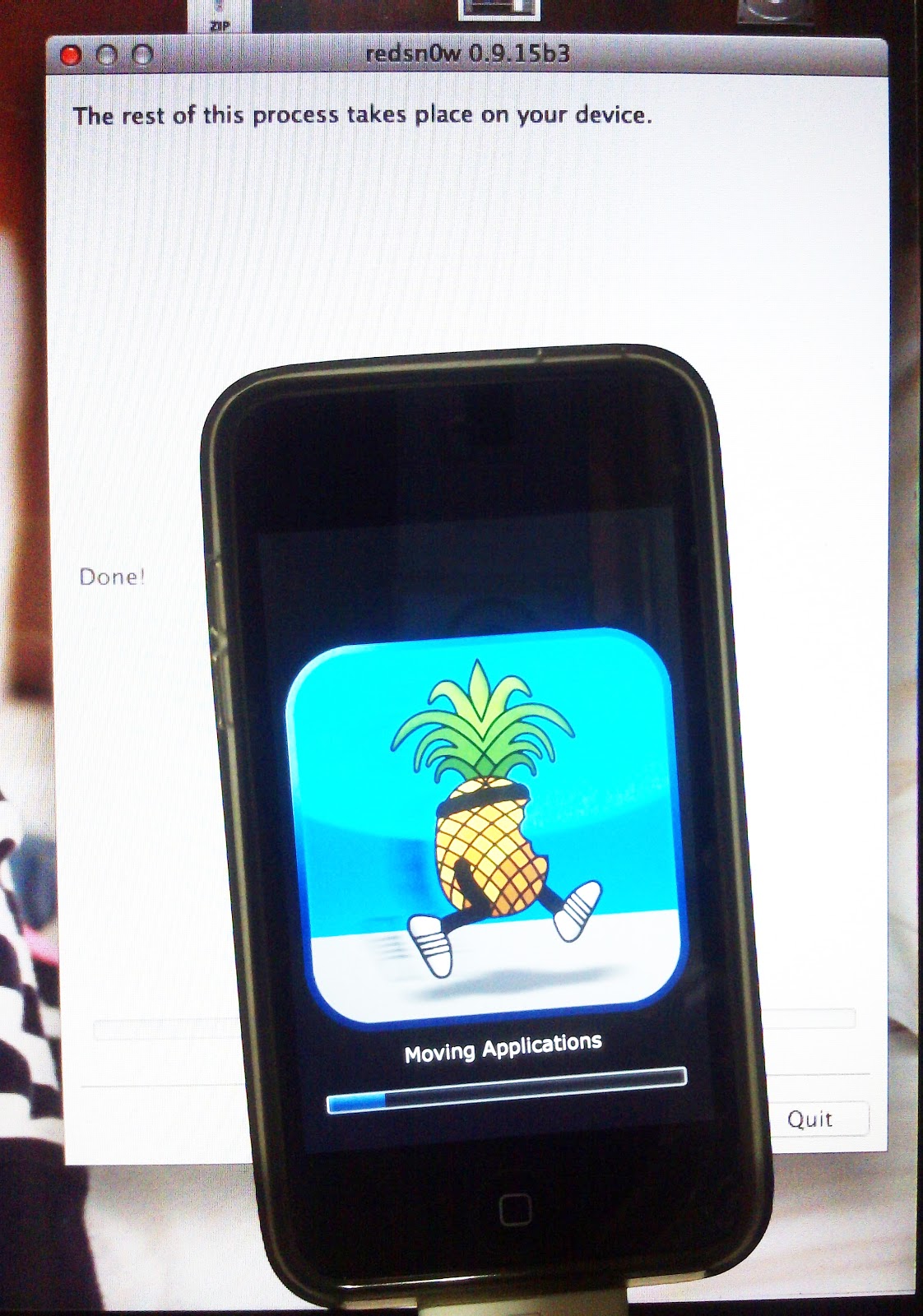
Nothing to do during the process. "The rest of the process takes place on your device." It takes about 8 minutes on my old iPod Touch 4 8G.
 

Something you need to know

Using your Mac/Macbook
1.How to Check ECID


Using Redsn0w

No data restore anymore but only Apps 

You cannot use the backup again because you are doing a downgrade but not a upgrade.

Remember to send out your photos and video using dropbox, box or Tonido, importing to iPhoto or whatever.
Backup your contacts too!
Basically it is like you are getting a brand new machine but you cannot retrieve all current data.


Activate iOS through iTune (old practice for iOS 4.3 and 4.2.1)


I nearly forgot I have to do so to activate the iOS device. Apple allows users to use iOS device alone after iOS 5.1.


Jailbreaking iOS 4.2.1 AGAIN


1. How To Jailbreak iPod Touch 4G, iPod Touch 3G, iPod Touch 2G On iOS 4.2.1 Using Greenpois0n [Mac]
http://www.iphonehacks.com/2011/02/how-to-jailbreak-ipod-touch-4g-ipod-touch-3g-on-ios-4-2-1-using-greenpois0n-mac.html

Note: My experience is that I failed to use redsn0w to jailbreak iOS 4.2.1 directly. It is stuck at the screen of a Apple in the middle. I have to tried for three times and wait at least 10 minutes each time. But it did not help.

Now I am following the guide using greenois0n. Let see if it works......well. It works smoothly!

Another problem is my daughter's favorite APPS Little Fox does not support iOS 4.2.1. but only 4.3+.

2. JailbreakMe 3.0 Released To Jailbreak iPhone 4, iPhone 3GS, iPad 2, iPad 1, iPod Touch 4G, iPod Touch 3G On iOS 4.3.3 Using Mobile Safarihttp://www.iphonehacks.com/2011/07/jailbreakme-3-0-released-to-jailbreak-iphone-4-iphone-3gs-ipad-2-ipad-1-ipod-touch-4g-ipod-touch-3g-on-ios-4-3-3-using-mobile-safari.html

This method is the most easiest and quickest way to jailbreak iOS device ever!

I now can restore from previous backup at iOS 4.2.1 to retrieve the APPS into the iPod. Great! Just wait to see.

Get Raisoo Apple Peel (Old version) connected to GPRS


Now the iOS version is 4.3.3. I can install Little Fox music box for my little daughter. Now it is play time for me.

Let me try to get it connected to the internet.

Enter Cyndia. Add source for "http://apt.raisoo.com".

Remember to install GPRS Connection and Raisoo main program.

Finally I tried the Raisoo Apple Peel (Old version). I succeeded to use GPRS to connect to the internet! Wow!

You can use Safari, WeChat whatever to connected to internet. It is no longer limited to some Chinese apps like UC Web, QQ, etc.


The SIM card is CM Mobile HK.

It is weird to see both "iPod" and "3G" label together. But when you see these (together with two SIM card), it is connected to internet via GPRS already.

You don't need to turn the Wi-Fi off before doing this. It will shut down Wi-Fi automatically. But I will recommend to shut down by yourself first, for sake of any error during usage.


Tomorrow I will try to use another SIM card other than CMNET.

......The Next day.....

Using Smartone (Hong Kong) is good for GPRS connection. However the upload/download speed is too slow to accept. I think I can take this connection as emergency. It always happens that you need to access internet to check a very important email or send a message during weekend or holiday.

The first time is the Perf Test data done using Raisoo Apple Peel for iPod Touch 4 GPRS. Download speed is 4bps. Upload speed is 2bps. The latency is about 4 seconds!
Surprisingly Raisoo works to imitate as a GPRS connection.

The second time is done using Wi-Fi (HKBN bb100).

There is a bug for the APN setting. The apps failed to save the current APN setting. Even though I typed "Smartone" and get connected. The APN field changes back to "CMNET". This does no harm if you use CM Mobile HK or China Mobile in China. But it is troublesome for me to type again when I need to connect to GPRS.

The one important point, as there is always a warning in the GPRS connection page. You can either use phone function (including SMS) or GPRS.

Snapshot of my old Raisoo apple peel for iPod Touch 4. 

I purchased it in November 2011.


Comparing to
iPhone 4
(with pink case)
One size larger
 

Friday, December 21, 2012

Indoor GPS?

谈谈室内定位技术

http://www.williamlong.info/archives/3178.html

Who Are The Players In Indoor Positioning?


http://indoor-positioning.co.uk/2012/03/who-are-the-players-in-indoor-positioning/


Indoor GPS Apps
http://www.meridianapps.com


霸權


香港人怎麼不會生氣﹖


因為正在做(明天DEADLINE)MBA課程有關risk management的功課時,搜尋到一篇關於霸權(作者行文於2009年,當時未有流行此字眼)的分享,引起一些發人深省的討論。


Monday, December 10, 2012

勁cutie的電音二胡?!!! Otamatone


It's a breeze to squeeze & tease out a tune with no keys!
“The world’s cutest, weirdest musical instrument”

Straight from Japan, the sensation known as the Otamatone has got to be the world’s quirkiest electronic musical instrument ever. Invented by Maywa Denki, the Otamatone is a great toy for kids, or a fun addition to any musician’s arsenal of unique instruments.
Most musical instruments don't have faces, and there is probably a very good reason for that; nobody thought of it before! Allow us to introduce one of the cutest musical instruments ever - and it has a face! It is a singing musical-note shaped toy which requires two hands to be played: while one hand holds and/or repeatedly opens and closes the mouth by squeezing the note's rubber cheeks to get vibrato (or any sort of wah-wah effect), the other hand controls the pitch of the tune by sliding the finger up and down the stem. The strip on the stem has no pitch labels or frets, so having a good musical ear is an advantage, but that said, you can easily just slide between notes, both for ease of playing and for even more musical effect. The distinctly Japanese Otamatone Electronic Instrument is wacky, adorable, and a great instrument for some truly unique electronic performances.
*Slide your finger up and down the stem to change the pitch.
*Squeeze the cheeks for vibrato.
*Three pitch levels and two volume levels.

[Source here: ]
http://www.alexcious.com/products/detail84.html?gclid=CJOz2vqcj7QCFSNU4godslMAJw

But this one called Otamatone Jumbo is somehow...looking stupid.
http://www.youtube.com/watch?v=g_1WvxYBGTk


And you can play iOS Otamatone too!
There of course iPad version. It is must more worthy to play! I just checked the price on the App Store. It cost HK $28.00, rather cheap.

Friday, December 07, 2012

Recycle, Reuse, Reduce - Turning your old PC into your own private cloud server


I have kept upgrading the harddisks with larger volume. But what about the old ones? It is what a waste to throw them into rubbish bins. Those IDE harddisks are no longer accepted to be donated to charity. There is also not well system for recyling this electronic goods in Hong Kong. 

I have came to an idea that I can make use of one of forgotten Dual-core PC and some harddisks of 320GB.

Here is some useful links I read.

Build your own personal cloud server

Turn an old PC into private online storage


Read more: http://www.pcadvisor.co.uk/how-to/software/3378792/build-your-own-personal-cloud-server/#ixzz2EKZdd6st

http://www.pcadvisor.co.uk/how-to/software/3378792/build-your-own-personal-cloud-server/?pn=2


Quickly Create A Personal Cloud On Your Devices & Stream Media With Bdrive

http://www.makeuseof.com/tag/create-personal-cloud-stream-media-bdrive/


Turn an Old Computer into a Networked Backup, Streaming, or Torrenting Machine with Ubuntu


http://lifehacker.com/5919558/turn-an-old-computer-into-a-networked-backup-streaming-or-torrenting-machine-with-ubuntu


The Most Valuable Technology That A Church Can Implement: Dropbox


http://geekrev.com/the-most-valuable-technology-that-a-church-can-implement-dropbox/


Don't Trust Cloud Security? Here's a Safer Local Alternative to Dropbox


http://internet.wonderhowto.com/how-to/dont-trust-cloud-security-heres-safer-local-alternative-dropbox-0139466/


Build Your Own cloud PC server - Tonido

http://www.pcadvisor.co.uk/how-to/software/3378792/build-your-own-personal-cloud-server/?pn=3

To create multi-user
http://www.tonido.com/forum/viewtopic.php?f=14&t=836

Thursday, October 04, 2012

全港哀悼 - 南丫島海難遇難者

2012年10月4日 巿民黑衫素服 哀悼南丫島海難遇難者 http://news.tvb.com/local/506cfb9c6db28c2106000002


Monday, September 17, 2012

Speedtest on your own NAS

[TUTORIAL] How to test the speed of your local network http://forum.qnap.com/viewtopic.php?t=10571 Speedtest Mini http://www.speedtest.net/mini.php SPEEDTEST.NET MINI Setup Instructions Download mini.zip Unzip it onto your server Decide on PHP, ASP.NET, ASP or JSP Select which index file to use Rename the file to index.html Load index.html in your browser Download Now You can also copy the commented code from index.html and paste it into an existing web page. Just be sure to keep the speedtest folder and speedtest.swf in place. You can host a free speed test on your own server that uses the same technology as Speedtest.net! Setup is very simple, and the only requirement is that your web server supports PHP, ASP.NET, ASP or JSP.This application is offered "as is" free of charge without any support - use it at your own risk. We will introduce new features to it every few months in required updates. As such you will have to download it again periodically. While Speedtest.net Mini will work on almost any web server, some require minor settings changes. Read the troubleshooting file included in mini.zip for further details. If you need a permanent speed test with detailed reporting and/or your own branding, please head over to the Ookla web site.

How to Use Apple’s OS X Lion Wi-Fi Diagnostic Tool

How to Use Apple’s OS X Lion Wi-Fi Diagnostic Tool

Monday, June 25, 2012

Macbook Pro HDD & RAM upgrade

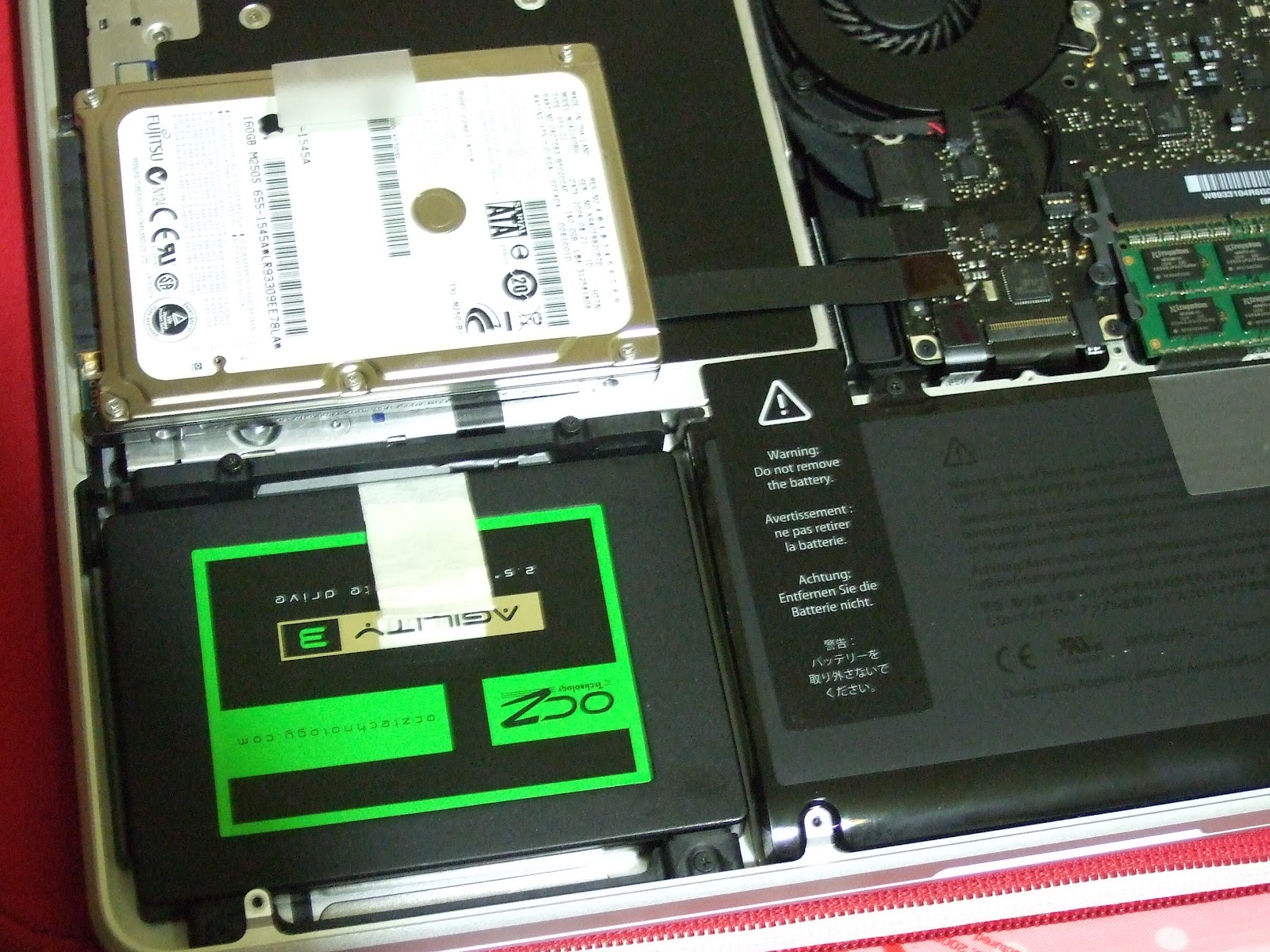
Recent RAM price has been dropped. I also try to upgrade my harddisk and RAM in the Macbook Pro 2009. It is originally 160GB 2.5" harddisk and 1GB DDR3 RAM. 

I chose OCZ 120GB green version and Kingston 4GB DDR3 x2. This Macbook Pro limits the RAM to 8GB. 

The way to open the back cap of the Macbook Pro is already easily searched from the internet. 

Unfortunately, the screws of the fixture of the harddisk are still T6 screw in this 2009, but not usual "+" ones. You may buy any screw driver set from shop. It looks like a star, similar but not really. 


I had created the boot USB drive. After the new blank harddisk is installed, just plug in the USB drive and select install Mac OS X Lion. You need to first upgrade to Mac OS X Lion first. 


Pandora's box: 日系摺疊智慧手機 SHARP -- sh7218u 開箱

Pandora's box: 日系摺疊智慧手機 SHARP -- sh7218u 開箱: 關於對此機的google服務和其他軟體改造,請參考 --   S HARP sh7218u 完全android化篇 我從以前就一直比較偏好摺疊機的設計,感覺不容易誤觸按鍵和傷到螢幕(現任的n82就常因為誤觸而解鎖加發簡訊) 無奈智慧型手機有傳統直立型、都一個樣的觸控...

Pandora's box: SHARP sh7218u 完全android化篇

Pandora's box: SHARP sh7218u 完全android化篇: 話說買了7218u後( 請參考 日系摺疊智慧手機 SHARP -- sh7218u 開箱 ) , 一直煩惱於日曆無法跟google同步,market也不能用的半殘android窘境,在參考一些論壇和玩機達人的文章後,決定自己來個軟體改造 (相關檔案文末有連結)

Saturday, June 23, 2012

iMovie projects lost after iMovie 09' update

After the update of iMovie 09' under the OS X Lion, I lost all the iMovie project!!!

The projects file are there but you cannot see them in the project window of iMovie. The project window is empty. After searching in the internet, I finally found the method to fix.

Source:
https://discussions.apple.com/message/9202163?messageID=9202163%25EF%25BF%25BD#9202163?messageID=9202163%25EF%25BF%25BD

Quote:
Here's how I got my project back after it disappeared: Close the iMovie application. Then on your desktop click to open "Macintosh HD>Users>YourName>Movies>iMovie Projects>"YourProject'sName." This folder will have the name of the project you "lost." Open the folder, and you will see "Project," which will look like a document, but will not open. There will also be folders for QuickLook and Stills. Go to the "Project" document and change the name of it to "Project.rcproject." Then open iMovie, and your project will be back in the projects just like it was before the crash. At least that was my experience.
Good luck!iMama

It works for me too!